A Catch and a Miss: What Building an AI Malware Detector Actually Teaches You
By Juan Aguirre
A few months ago we pointed our malware detection engine at AI agent skills and wrote about what came out the other end: 238 skills, a lot of flags, zero confirmed malware, and one very enthusiastic false alarm about a skill that was warning people about prompt injection. That post was about a new ecosystem. This one is about the engine itself.
Because here's the thing nobody tells you when you set out to build an AI-powered malware detector: the AI is the easy part. You can have a model read a setup.py and tell you it looks suspicious in an afternoon. The hard part is everything around it. Which packages do you look at? What counts as a signal? How many signals before you spend money asking a model? What does your system do when the malware isn't in the code at all?
We learned the answers to those questions the usual way, by getting some of them wrong and then building, watching what the engine caught, and paying close attention when the wider community caught something in a shape we hadn't hardened against yet. So rather than a tidy architecture diagram, we're going to tell you about two packages from the last couple of weeks. One we caught before any other vendor. One the community flagged first, in a class of attack we then went and closed the gap on, and that one taught us more.
How the engine works (the parts we can share)
The shape of it hasn't changed much since the skills post, it's a funnel:
Two things matter for the rest of this post. First, we don't just scan a package, we compare each release to the one before it, because "what changed?" is often a better question than "what's in here?". Second, and this one comes back to bite us later, almost everything the engine is good at, it's good at because it can read the code: install hooks, obfuscation, suspicious calls, credential paths, all of it text on a page. When the interesting part isn't text, we're on weaker ground.
If you read the skills post, you already know the recurring villain: signal-to-noise. Every rule we've ever written has, at some point, fired on something perfectly legitimate. Layers two through four exist because layer one, on its own, would bury us.
With that in mind, let's look at what the funnel caught.
Spotlight: prosocks, or watching someone build a botnet in public
On September 24, a package called prosocks started showing up on PyPI. Then it showed up again. And again. By lunchtime (UTC) there were about thirty versions, 1.0.0 through 1.0.32. Our engine flagged it, we reported it to PyPI, and it was gone before any other vendor had published on it.
The summary line says SOCKS5 Proxy Agent, and to be fair to the author, that's exactly what it is. What the summary leaves out is whose proxy it becomes.
What it does
The final version, 1.0.32, does this the moment anything imports it:
And the background process:
That's proxyware. The operator ends up with a panel full of exit nodes, each one listed with its public IP, its bandwidth and the password to use it. Whatever gets routed through your machine leaves the internet with your IP address on it. Credential stuffing, scraping, ad fraud, worse, and the abuse report goes to you.
The bandwidth test is the detail that got us. It's not there to make the malware work, it's there to rank you. Somebody is pricing their inventory.
The password is decorative
Here's the auth handshake:
The proxy only asks for the password if the connecting client offers password auth. A client that offers "no auth" gets waved straight through. So it isn't just the operator who can use your machine, it's anyone who can reach port 9050. On a laptop behind a home router, that means your LAN. On a cloud VM or a build server with a public IP, it means the internet.
Tor users are accidentally immune
Before launching, the agent checks whether something is already listening on 127.0.0.1:9050, reasoning that if so, it must already be running. Port 9050 is Tor's default SOCKS port. If you run Tor, prosocks looks at your machine, decides it's already infected, and goes home. We don't think that was intentional. It made us laugh anyway.
Thirty versions in one morning
This is the part we found most interesting, and it's the reason we pulled every single version instead of just the latest. Diffing them one after another is like reading someone's commit history, except the commits are live on PyPI.
Is 1.0.0 malicious? Honestly, on its own, it's arguable. It's a proxy agent you have to run by hand and point somewhere. But 1.0.13 is unambiguous, and the road between them is short enough to walk in an hour. It's "trust then weaponize" compressed into a single morning. Remember that, it comes back.
It also meant our engine was chasing a moving target. The suspicious URLs and IP-lookup calls lit up from early on, an exfiltration-endpoint pattern joined in the 1.0.20s, and from 1.0.28 the silent, detached background launch became its own signal. No single version tripped everything, but every version tripped enough. And that's all the rules are for. They don't convict anything, they just decide what's worth the AI layer's time. It was the AI layer that read the code, confirmed it was malicious and worked out what it actually did: the registration, the open proxy, the panel.
Two tricks that didn't work
Watching the author iterate, you can also watch them be wrong about Python packaging, which we say with sympathy because we've all been wrong about Python packaging too.
The .pth trick in 1.0.26 is a nasty one when it works: a .pth file in site-packages whose line starts with import runs every single time Python starts. So we went looking for it in the wheel, expecting the worst. It was there, at prosocks-1.0.26.data/data/prosocks.pth. Which pip installs to the environment's root directory, not to site-packages, where Python never looks for .pth files. As far as we can tell, it never fires. The author seems to have reached the same conclusion, because it was gone in the next release.
Then there's this comment, sitting right above the import-time launcher:
It doesn't. pip doesn't import the packages it installs. And the flip side matters for defenders: every version shipped a wheel, pip prefers wheels, and installing a wheel never runs setup.py. So all that effort in the install hooks, including the Windows Startup persistence, only fires for people installing from source. The import-time launcher is the path that actually hits most victims. If you're triaging an exposure, check for ~/.prosocks/ and a Python process holding port 9050, not just the Startup folder.
The operator left their panel in the package
From 1.0.28 onward, the setup switched to find_packages(), which does exactly what it says: it found every package in the author's working directory. Including panel_admin/, a Flask app with a SQLite table called agents, CORS open to *, and app.run(host="0.0.0.0", port=3000, debug=True) at the bottom. Classic.
Before you get excited (we did), it isn't the live backend. The agent talks to /api/register, /api/heartbeat and /api/bandwidth, and the shipped panel has /api/agents/register, /api/agents/update and /api/stats. It's a draft, or an older copy, swept up by accident. Still, not every day the malware ships with its own control panel. There's also a comment in the agent that reuses saved credentials "to avoid doublons", doublon being French for "duplicate", which is a fun little tell and exactly the kind of thing we're not going to hang any attribution on.
We also took a passive look at where kalnetz[.]store lives. It's a small rented VPS, and the same IP had hosted a run of French-language sites in the days just before: a couple of api-crypto-payment placeholders and, registered less than an hour before kalnetz itself, a casino landing page reading "Le jeu commence bientôt ici" (the game starts here soon). Phishing scams? Rented IPs change hands, so we won't call it proof of a single operator, but alongside the doublon comment it's a consistent French-language thread.
The live panel, when we looked, was online and reporting zero connected agents.
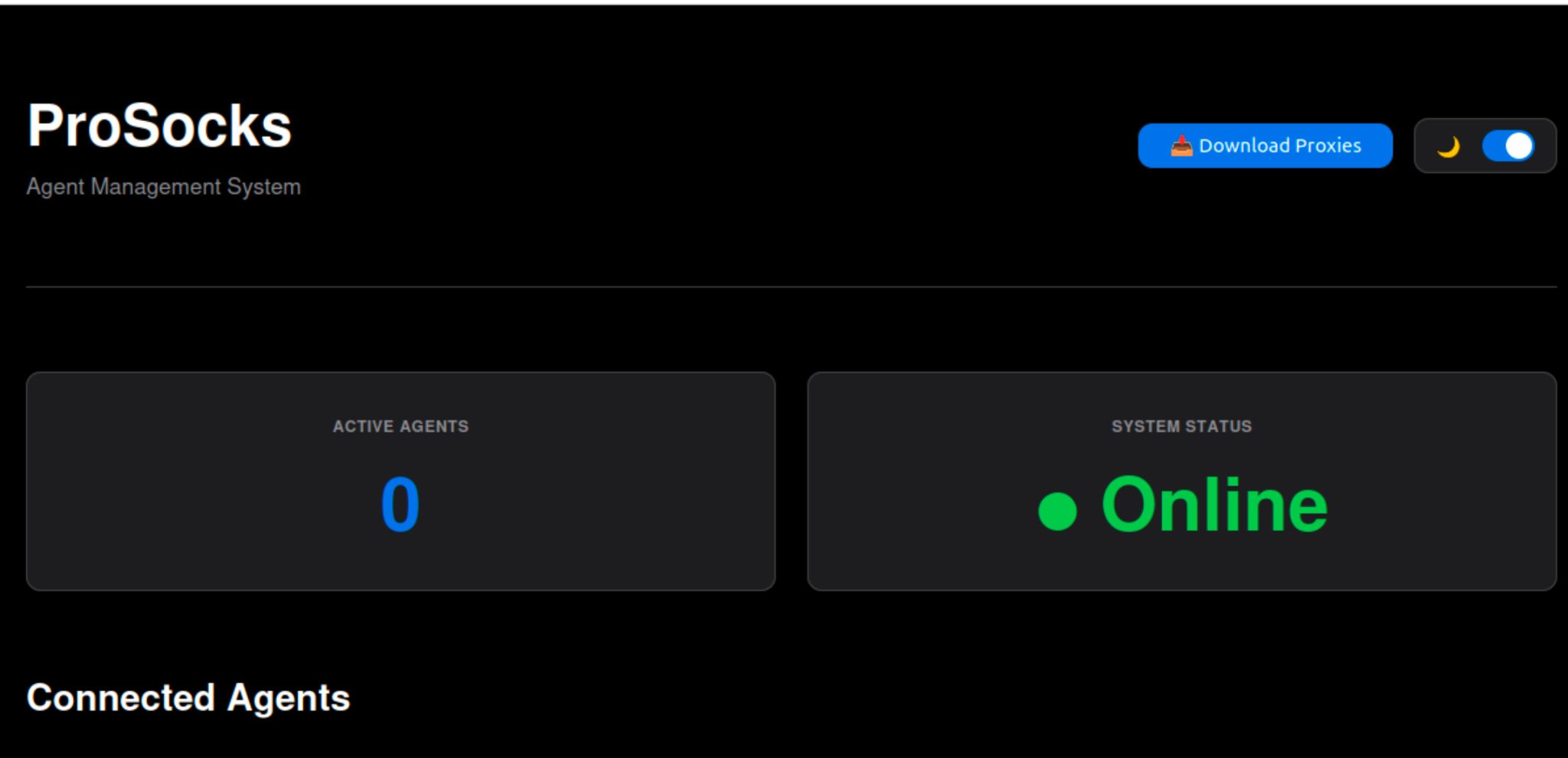
That number is a snapshot, not a verdict, a panel like this doesn't necessarily persist history, and we can't see what came before we did. But an empty roster is what you'd hope to see: the package was flagged, reported and pulled from PyPI fast enough that whatever this thing was built to collect, it hadn't.
The one that pushed us
The best forcing function for a detector isn't the malware you catch, it's the one the wider community catches in a shape you hadn't accounted for yet. MemTensor was that for us.
On September 23, an attacker used publish tokens stolen from MemTensor's own release pipelines to push malicious releases of two legitimate, established packages: MemoryOS 2.0.34 on PyPI, and @memtensor/memos-cloud-openclaw-plugin 0.1.21, 0.1.23 and 0.1.25 on npm. Both carried the same cross-platform Go implant, which researchers call "sckit". It ran on install or import, stole developer credentials (.npmrc, .pypirc, .git-credentials, SSH keys, Vault tokens, cloud token caches) and sent them to servers under skyleen[.]fr. It also tampered with CI, planting BASH_ENV through $GITHUB_ENV so later build steps ran attacker code and could hand over more publishing tokens.
SafeDep flagged it, with Socket, Aikido and StepSecurity publishing their own analyses. Once the campaign was public, we had advisories out for both packages the same day, so Safety customers were protected against these versions while the wider write-ups were still landing. What our engine didn't do was flag it on its own ahead of those reports, and that's the part worth digging into, because the reason it didn't is a genuinely interesting gap.
This is the uncomfortable shape of the serious supply-chain attacks: they don't show up as a sketchy new package, they show up as a new release of something you already trust and already installed. Nobody typosquats their way into your CI. They steal a token for something you already depend on.
When we studied the campaign, the gap was clear. Remember what our engine is best at: reading code. This one put the important parts where a code reader doesn't go. A binary that showed up for the first time in a release didn't stand out from one that had always been there. Our text rules skip some compiled files on purpose, to cut noise, and the implant's list of credential files to steal existed only inside the Go binary. And the two techniques that did the real work, launching a bundled binary detached at import time and planting BASH_ENV through $GITHUB_ENV, didn't have a dedicated rule yet.
And here's the part that stuck with us. Scroll back up to prosocks: a silent, detached background launch at import time. We caught that because it was written in code we could read. The same behaviour, once it moves into a compiled binary, was invisible to a text scanner, and attackers know exactly where text scanners don't look. That contrast is the whole lesson, and it's what we set out to fix.
What we changed
We built new detections for this shape of attack, at a level of detail we're comfortable sharing:
BASH_ENV through $GITHUB_ENV is now a signal.None of these flags a package on its own. Each one is a combination of conditions, not a keyword, and a package still needs several signals together before it goes to AI review. We care about false positives as much as detection, and the next section is why.
Two of our first ideas were wrong
Before calling any of it done, we ran the new detections against 2,500 real, recently published packages. The final versions would have newly escalated zero of them. Each detection matched at most 2 of the 2,500 (0.08%), and those were legitimate tools.
The first versions didn't look like that. An early platform check matched 23 packages, every one of them a legitimate CLI starting its own background process. And a CI-tampering idea that sounded great on paper matched 10 legitimate release tools. Both got narrowed or dropped. If we'd shipped them, we'd have taught our own review layer to ignore the exact signals we built them for.
Then we had the changes reviewed adversarially, by someone whose job was to break them. That review found the best bug of the whole exercise: our first version of the binary check would have missed Go binaries. Go stores its strings packed together, and our matcher was looking for boundaries that weren't there. The headline detection, built specifically because of a Go implant, would have walked right past a Go implant.
It's that feeling when you've spent a week building the perfect trap, you're proud of it, you're showing it to people, and someone leans over and points out the door is open on the other side. Humbling. Also exactly why you ask. We fixed it and added tests so it can't quietly regress.
What we'd tell anyone building one of these
IoCs
prosocks (PyPI, 1.0.0 to 1.0.32, all versions)
Network
kalnetz[.]store (/api/register, /api/heartbeat/<id>, /api/bandwidth/<id>)0.0.0.0:9050ip-api[.]com/json/, api.ipify[.]org, speed.cloudflare[.]com/__down?bytes=10000000 (legitimate services, suspicious in combination)Files
~/.prosocks/config.json, ~/.prosocks/agent.json%APPDATA%\Microsoft\Windows\Start Menu\Programs\Startup\prosocks.batProcesses
<python> -m prosocks hxxps[:]//kalnetz[.]store or <python> -m prosocks.main hxxps[:]//kalnetz[.]storeMemTensor / sckit
Packages
MemoryOS 2.0.34 (PyPI)@memtensor/memos-cloud-openclaw-plugin 0.1.21, 0.1.23, 0.1.25 (npm)Network
skyleen[.]fr and subdomains, e.g. 8a8acaf167b3[.]skyleen[.]fr, c747d139e7e9[.]skyleen[.]fr, d4f77a3a8cb0[.]skyleen[.]fr (C2, randomized subdomains)Files in the package
memos/_stage0.py (PyPI stage-0 loader), lib/sckit.js (npm loader).sckit/<os>-<arch>/sckit[.exe] (npm) and equivalent bundled Go implant on PyPI, one build per platformDropped on the host
$HOME/.memos/.cache/runtime, $HOME/.openclaw/.cache/runtime (implant state)runtime-update.yml (GitHub Actions workflow the worm writes for persistence, runs sckit stage0)sckit_poetry_build.py, _pypi_bridge.sh, sckit-publish-bridge.sh (CI-tampering scripts; the implant also writes BASH_ENV= into $GITHUB_ENV)sckit implant hashes (SHA-256, npm builds)
381ac6dc1715d9298fe81b2a53a11f7b7d78e361ee3a6619ad54f8c4b062cc18f8ccdd1da7dff1aef16377a2842bc7acf7c516e32122dd6e42dc4a4e57653fce56cd3416d2ec2aa7e7cec2a06010cf0b58eb09c0a5486809df52afeaca8f14beHow Can Safety Help Protect You?
Both of these packages do their damage the first time something imports them, which is before most security tooling gets a look. The Safety Firewall checks every package installation request before it reaches the public registry, so a malicious package like prosocks is blocked before it lands on a developer machine or a CI runner.
Want to try Safety Firewall? You can sign up and get started yourself, no call required.
Stay curious. Next time a scanner tells you it caught everything, ask it what it didn't look at.